Inside: Six delightful spring-themed Boom™ Cards activities that make reviewing music concepts feel fresh and fun during busy springtime lessons! These self-correcting online games cover everything from white piano keys with unicorns and rainbows to music math addition, grand staff note spelling, ear training challenges, and major and minor chord identification. Students will love racing against the clock to improve their speed, playing the musical spelling words they create on the piano, and analyzing chords step-by-step – plus you’ll have engaging review activities ready in seconds for both online and in-person lessons!
Table of Contents
Today I have some fun spring online music games for you!
Springtime is usually a busy season for music teachers, so having a few sets of spring online music games you can pull out for easy review is an absolute win!
I personally love Boom™ Cards for piano lessons because they are self-correcting, can be ready in just a few seconds anytime your student needs extra review, and can be used in online piano lessons, online piano lessons, or sent home for the student to review on their own.
First, I will walk you through six spring online music games perfect for beginning to intermediate piano students to review concepts from piano keys to chords and more.
Then, if you’re new to Boom™ Cards and need to know how they work, I’ll share a quick-start guide for Boom Cards.
Need something to print? Check out our blog post, How To Use Spring Music Worksheets In Your Piano Studio.
A look inside these educational Spring Online Music Games
1) White Piano Keys With Unicorns & Rainbows
This deck of Boom Cards with its pastel colors and rainbows makes me think of springtime!
There are 28 cards in this deck, which provide your student a good review for all of the white piano keys. The student will see a cute little unicorn on a white piano key and must tap the correct answer.
Teaching Tip: This is the perfect deck to help your student gain speed in knowing their piano keys! Set a stopwatch and see how quickly your student can review the entire set. Log the time and come back a week later (after they’ve reviewed it daily at home) and see how well they can beat their time!
2) Beginning Piano Spring Online Music Games

There are a lot of music concepts beginning students need to learn, and spring is a great time to review and test their knowledge!
This spring online music game reviews all of the standard theory concepts like piano keys, finger numbers, note values, dynamics, intervals, and more.
If you’re using the Adult Piano Adventures All-In-One, Book 1, these cards cover everything in Unit 1.
Teaching Tip: Use this deck to test your students’ knowledge. Since this covers the basic beginning concepts, it will provide you as the teacher a good idea of what your student needs extra practice and review in.
- Test the deck for yourself here
- Get Beginning Piano Boom™ Cards – Music Symbols, Rhythms, Dynamics, & More here
For even more beginning piano lesson ideas, check out our two blog posts: 7 Unique Ways to Rock Your First Month of Piano Lessons With Activities Students Love and 7 Creative Activities for First Piano Lessons.
3) Music Math Addition BOOM™ Cards For Piano Lessons – Adding Note And Rest Values
Help your student with rhythm with these fun music math Boom Cards! Students will review quarter notes/crotchets & rests, half notes/minims & rests, dotted half notes/dotted minims, whole notes/semibreve and rests in this deck.
There are 29 simple math equations that will help students really know how many beats each note gets. Before the student starts, there is a helpful review sheet where the student must write down how many beats each note gets.
Teaching Tip: Even if your student doesn’t know all of the note values, you can use this deck. Walk them through how many beats each note gets as they work on each problem. By the time they reach the end, they will remember how many beats many of the notes get!
- Test the deck for yourself here
- Get Music Math Addition BOOM™ Cards For Piano Lessons – Adding Note And Rest Values here
Have students who can’t get enough music math? Read 7 Ways to Use Music Math Worksheets in a Variety of Music Classes.
4) Treble And Bass Clef BOOM™ Cards For Piano – Grand Staff Music Spelling Words
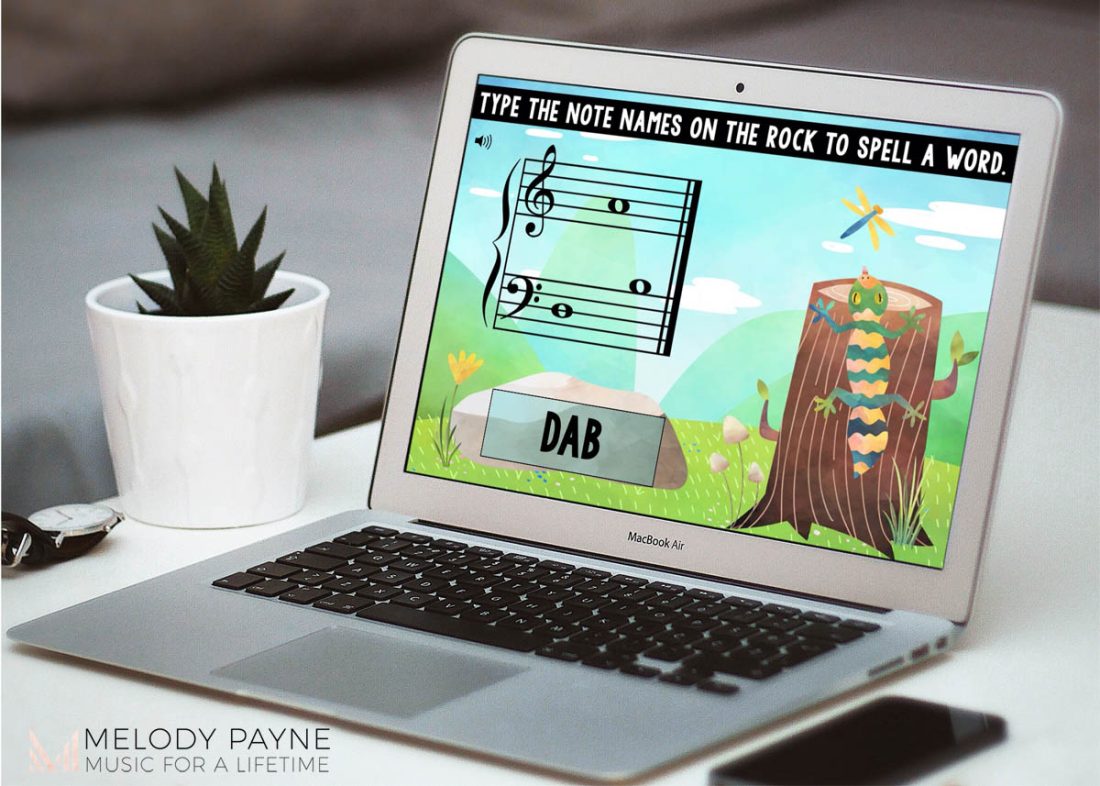
Reviewing notes is so much more fun when you can spell words with the notes in spring online music games! Not only do students love seeing words appear from naming notes, they also get the bonus of checking their work–if they don’t spell a real word, it means they got a note wrong!
Teaching Tip: What do these words sound like on the piano? Bring the game to the piano by playing the word once the student has identified all of the letters. This further helps them with sight-reading.
- Test the deck for yourself here
- Get Music Math Addition BOOM™ Cards For Piano Lessons – Adding Note And Rest Values here
For even more note spelling game ideas, read our blog post, Ten Tips for Using the Springtime Musical Spelling Bee Game at Piano Lessons.
5) Ear Training Music Spring Online Music Games
Your intermediate students will get good sight-reading and ear-training practice with this springy floral online music game.
Each card presents two musical excerpts that are similar. They must listen to hear which music excerpt is correct!
Teaching Tip: If your student is struggling to sight-read as quickly as the audio plays, have them play both excerpts and see which one matches what they heard at a faster tempo. It may take your student a few tries to get used to following along, but encourage them to not give up too quickly!
- Test the deck for yourself here
- Get Ear Training Music BOOM™ Cards For Piano Lessons – Aural Skills Ties Syncopation here
6) Spring Online Music Games for Grand Staff Major And Minor Root Position Chords Review
Once your students have learned their major and minor chords, it can be easy to mix them up. This Boom Card deck will help your students get the review they need by reviewing both treble and bass clef root position chords.
Featuring cute animals, students can go step by step to analyze the root letter, if it’s natural or flat or sharp, and finally if it’s major or minor in these spring online music games.
Teaching Tip: Encourage your student to play the chord to train their ear to hear whether it’s major or minor. This will also help strengthen their sight-reading.
What Spring Online Music Games do Your Students Love?
We’d love to hear your suggestions for spring online music games! What do you and your students love? Comment below!
Did you Find this Blog post helpful? check out these!
- 4 Creative Winter Online Music Games for Piano Lessons
- 10 Online Music Games for Fall
- 3 Easy Ways To Use Printable Games In Online Piano Lessons
If you have never used Boom Cards™ in piano lessons, then start here.
It is not hard to use Boom Cards™ in either in-person or virtual piano lessons. But there are a few helpful things to know to get started.
1) You need to have a Boom Learning account
You can sign up for a free Boom Learning account here which allows you to assign Boom Cards™ for up to 5 students (more students is a paid plan).
We love this quick, 5-minute walkthrough video by one of our music Boom Cards™ creators, Kelly.
2. You can get a free app for Boom Cards™
Boom Cards™ can be played on desktop computers, laptops, or even iPads, tablets, iPhones, and other smartphones.
Search for the Boom Cards™ app on your device to use anywhere!
This makes it especially easy for students to play at home on any setup they have.
3. You can screen share Boom Cards™ for virtual lessons
If you use Zoom or any other app that allows you to screen share, then Boom Cards™ are a great option for virtual lessons because they can see the screen.
4. You can play Boom Cards™ at the piano!
While Boom Cards™ are excellent for off-bench piano lesson options, you can also couple the Boom Cards™ with the piano.
For example, if you’re playing a note reading card set, have the student play the note on the piano before clicking the answer on the Boom Cards™.
5. Boom Cards™ require internet access
While they can be used on any device anywhere, Boom Cards™ do need internet access.
6. We have a blog post even more in-depth about Boom Cards™
Hopefully this is enough to get you started. But if you like to read even more before diving into something new (such as how to assign Boom Cards™ and be sure they’re shuffled), read our blog post, Getting Started With Boom Cards™ In Piano Lessons.